
EquipDash
Runs an EquipDash rental business from ChatGPT: bookings, availability, payments, inventory, staff and reports.

Images: equipdash.com
What EquipDash can do in ChatGPT
Run your rental business by chatting.
Booking Management
Create and update bookings for rentals and experiences.
Availability And Pricing
Check what is free and its price for any dates.
Payments And Refunds
Send payment links, refund and apply promo codes.
Inventory Alerts
Track stock levels and get low-stock warnings.
Revenue Reports
See revenue, booking trends and top customers.
You stay in control
You approve access, and you can disconnect EquipDash at any time.
Apps 1
What EquipDash does in ChatGPT
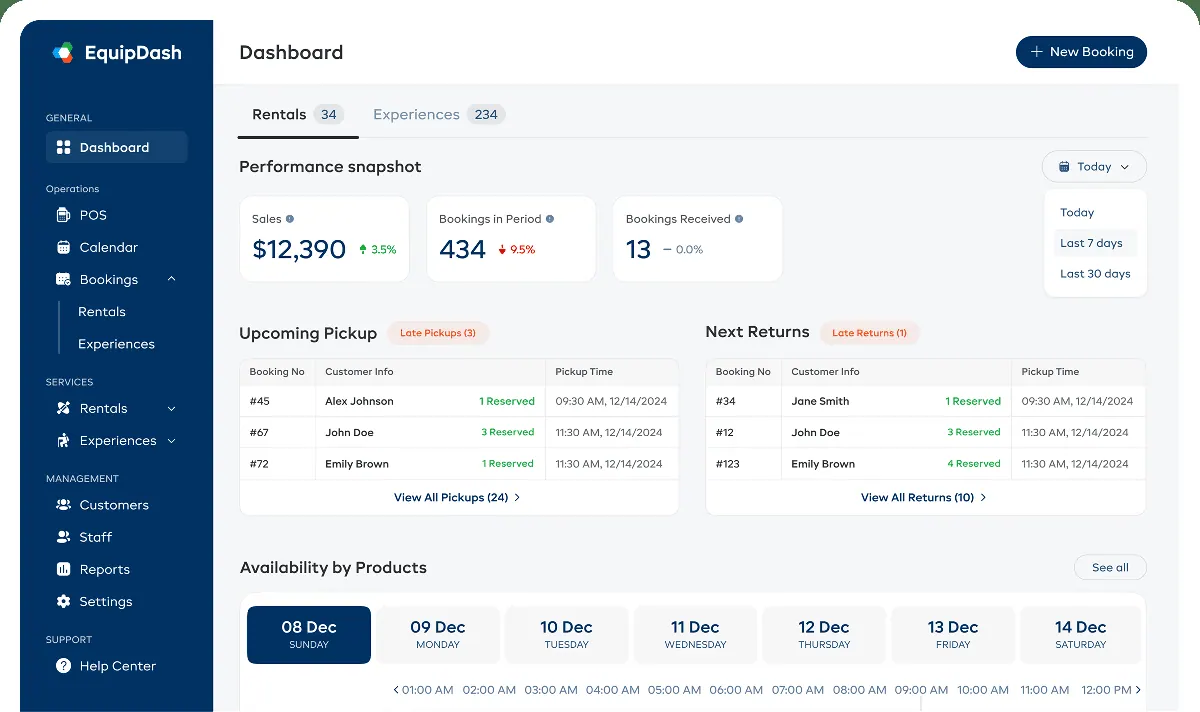
The EquipDash plugin connects ChatGPT to an EquipDash account, the software used by rental and experience businesses. Owners and staff can create and manage bookings, check whether products are free for a date range and work out the price without opening the dashboard.
It covers money too. You can send payment links, issue refunds and apply promo codes, and look up revenue summaries, booking trends and your top customers. Customer records and their full booking history are also searchable, so you can answer a customer question without digging through the dashboard yourself.
Beyond bookings, it tracks stock levels and gives low-stock alerts, and it handles staff schedules and shifts. The listing counts 123 tools in total, spread across bookings, products, experiences, customers, payments, staff, inventory, promotions and reporting. You connect by authorising your EquipDash account through OAuth.
Who it is for
- Rental shops using EquipDash
- Tour and experience operators
- Managers handling staff shifts and stock
How to add EquipDash to ChatGPT
- Open the EquipDash listing in ChatGPT ↗.
- Click Install plugin.
- Sign in to your EquipDash account when asked and approve the access it requests.
- Start a chat and ask for what you need, mentioning EquipDash if ChatGPT does not pick it up.
- To stop, disconnect EquipDash under apps in your ChatGPT settings.
Questions about EquipDash
What is the EquipDash ChatGPT plugin?
The EquipDash plugin connects ChatGPT to an EquipDash account, the software used by rental and experience businesses. Owners and staff can create and manage bookings, check whether products are free for a date range and work out the price without opening the dashboard. It is listed in ChatGPT's plugin marketplace under Business & Operations.
What can I ask EquipDash to do in ChatGPT?
For example: "Show me today's bookings", "Is the tandem kayak free this Saturday, and what would it cost?", "Send a payment link to the customer on booking 1042".
Who makes the EquipDash plugin for ChatGPT?
The ChatGPT listing names EquipDash Software LLC as the developer. The version listed on 8 October 2026 was 1.0.0.
How do I add EquipDash to ChatGPT?
Open the EquipDash listing in ChatGPT, click Install plugin, sign in to your EquipDash account and approve the access it asks for. Then ask for what you need in a chat, mentioning EquipDash if ChatGPT does not pick it up.
Can EquipDash change things in my account, or only read?
Once you authorise your EquipDash account, it can read and change bookings, products, customers, payments, inventory, staff schedules and promotions.
Who is the EquipDash plugin for?
Rental shops using EquipDash, tour and experience operators and managers handling staff shifts and stock.
Can EquipDash take payments from the chat?
It can send payment links, process refunds and apply promo codes in your EquipDash account.
How many actions does it support?
The listing says 123 tools across bookings, products, experiences, customers, payments, staff, inventory, promotions and reporting.
Does EquipDash see my ChatGPT chats?
When EquipDash is connected, ChatGPT may share the parts of your chats and memories that matter for a request with EquipDash. What EquipDash does with that data falls under its own terms and privacy policy. ChatGPT keeps your training-data settings, and you can disconnect at any time.
How do I disconnect EquipDash from ChatGPT?
Open your ChatGPT settings, go to apps, and disconnect EquipDash. You can reconnect later from the listing.
What are alternatives to EquipDash in ChatGPT?
Similar plugins in the ChatGPT marketplace include Cashfree, EZFlow Pro and HoneyBook. Each has its own page in this directory.



Privacy and your data
When EquipDash is connected, ChatGPT may share the parts of your chats and memories that matter for a request with EquipDash. What EquipDash then does with that data falls under its own terms and privacy policy, not only OpenAI's. ChatGPT keeps your training-data settings for data that comes from connected apps, and you can disconnect at any time.
EquipDash privacy policy ↗EquipDash terms ↗OpenAI: apps in ChatGPT ↗