
Hugging Face
Lets you look through Hugging Face models, datasets, Spaces and research papers from ChatGPT.

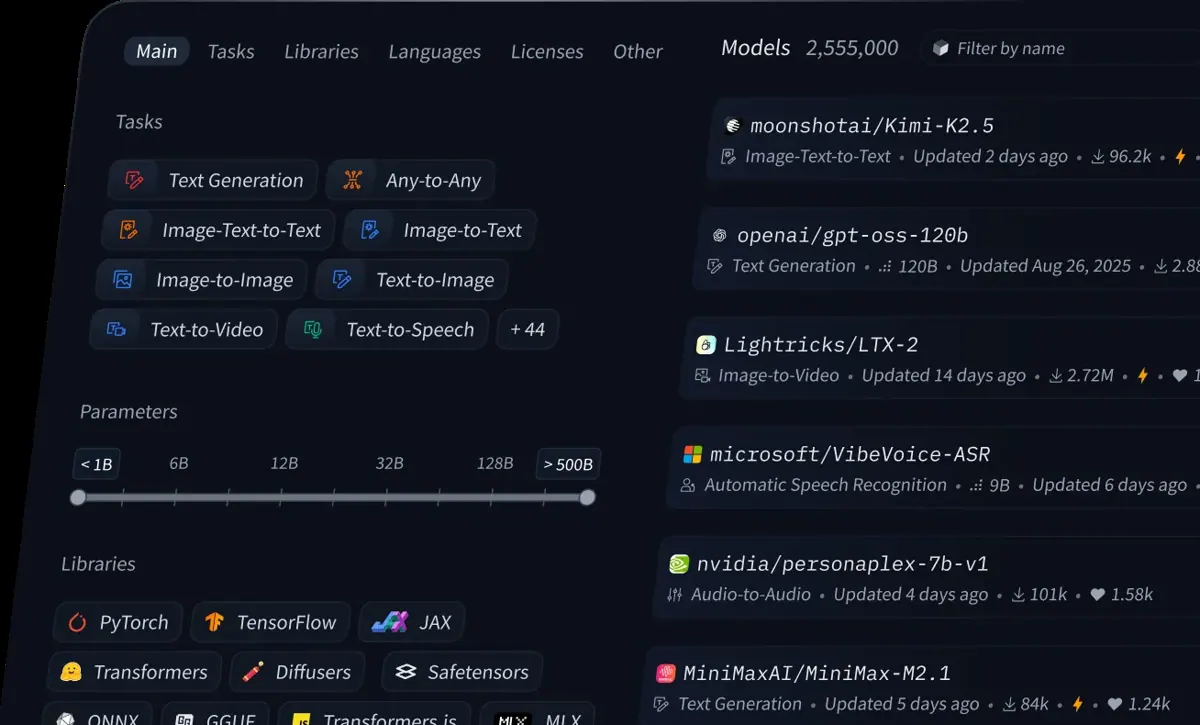

Images: huggingface.co
What Hugging Face can do in ChatGPT
Look through models, datasets, Spaces and papers.
Model Lookup
Find and inspect AI models shared on Hugging Face.
Dataset Browsing
Look through datasets and check what they contain.
Spaces
Find demo apps that people host on Hugging Face.
Research Papers
Look up papers through the Papers skill.
Image Generation
Try image models such as FLUX.1 from the chat.
You stay in control
You approve access, and you can disconnect Hugging Face at any time.
Apps 1
What Hugging Face does in ChatGPT
The Hugging Face plugin connects ChatGPT to Hugging Face, the site where people share AI models, datasets and demo apps called Spaces. With it you can look up and inspect models, datasets, Spaces and research papers without leaving the chat. The listing itself is short, so this page sticks to what it states.
It comes with a set of skills. Their names include the HF command line tool, Community Evals, Datasets, Gradio, Jobs, LLM Trainer, Papers and Paper Publisher, with three more not named on the listing. The names point to work like handling datasets, running jobs and dealing with papers, but the listing does not explain each one.
The one example request on the listing is generating a picture of a farm with the FLUX.1 image model, so it can also be used to try models, not only read about them. The listing marks it as interactive and says it can read and write.
Built-in skills
The listing says Hugging Face comes with 8 named skills plus 3 more. Skills are ready-made instructions ChatGPT can use for a specific job.
- HF CLI
- Community Evals
- Datasets
- Gradio
- Jobs
- LLM Trainer
- Paper Publisher
- Papers
Who it is for
- Developers picking AI models
- Researchers following new papers
- Data teams looking for datasets
How to add Hugging Face to ChatGPT
- Open the Hugging Face listing in ChatGPT ↗.
- Click Install plugin.
- Sign in to your Hugging Face account when asked and approve the access it requests.
- Start a chat and ask for what you need, mentioning Hugging Face if ChatGPT does not pick it up.
- To stop, disconnect Hugging Face under apps in your ChatGPT settings.
Questions about Hugging Face
What is the Hugging Face ChatGPT plugin?
The Hugging Face plugin connects ChatGPT to Hugging Face, the site where people share AI models, datasets and demo apps called Spaces. With it you can look up and inspect models, datasets, Spaces and research papers without leaving the chat. The listing itself is short, so this page sticks to what it states. It is listed in ChatGPT's plugin marketplace under Developer Tools.
What can I ask Hugging Face to do in ChatGPT?
For example: "Generate a realistic farm using FLUX.1", "Find popular text-to-speech models on Hugging Face", "Show me datasets for English sentiment analysis". It also comes with built-in skills such as HF CLI, Community Evals and Datasets.
Who makes the Hugging Face plugin for ChatGPT?
The ChatGPT listing names Hugging Face as the developer. The version listed on 8 October 2026 was 1.0.0.
How do I add Hugging Face to ChatGPT?
Open the Hugging Face listing in ChatGPT, click Install plugin, sign in to your Hugging Face account and approve the access it asks for. Then ask for what you need in a chat, mentioning Hugging Face if ChatGPT does not pick it up.
Can Hugging Face change things in my account, or only read?
The listing says it is interactive and can read and write. It works with Hugging Face models, datasets, Spaces and papers.
Who is the Hugging Face plugin for?
Developers picking AI models, researchers following new papers and data teams looking for datasets.
Can the Hugging Face plugin run models, or only search them?
The listing's example asks it to generate an image with FLUX.1, so it can be used to try at least some models from the chat.
Which skills come with the Hugging Face plugin?
The listing names HF CLI, Community Evals, Datasets, Gradio, Jobs, LLM Trainer, Paper Publisher and Papers, and says there are three more.
Does Hugging Face see my ChatGPT chats?
When Hugging Face is connected, ChatGPT may share the parts of your chats and memories that matter for a request with Hugging Face. What Hugging Face does with that data falls under its own terms and privacy policy. ChatGPT keeps your training-data settings, and you can disconnect at any time.
How do I disconnect Hugging Face from ChatGPT?
Open your ChatGPT settings, go to apps, and disconnect Hugging Face. You can reconnect later from the listing.
What are alternatives to Hugging Face in ChatGPT?
Similar plugins in the ChatGPT marketplace include Alloy, Tavily and Cloudinary. Each has its own page in this directory.



Privacy and your data
When Hugging Face is connected, ChatGPT may share the parts of your chats and memories that matter for a request with Hugging Face. What Hugging Face then does with that data falls under its own terms and privacy policy, not only OpenAI's. ChatGPT keeps your training-data settings for data that comes from connected apps, and you can disconnect at any time.
Hugging Face privacy policy ↗Hugging Face terms ↗OpenAI: apps in ChatGPT ↗