
Pocket Runway
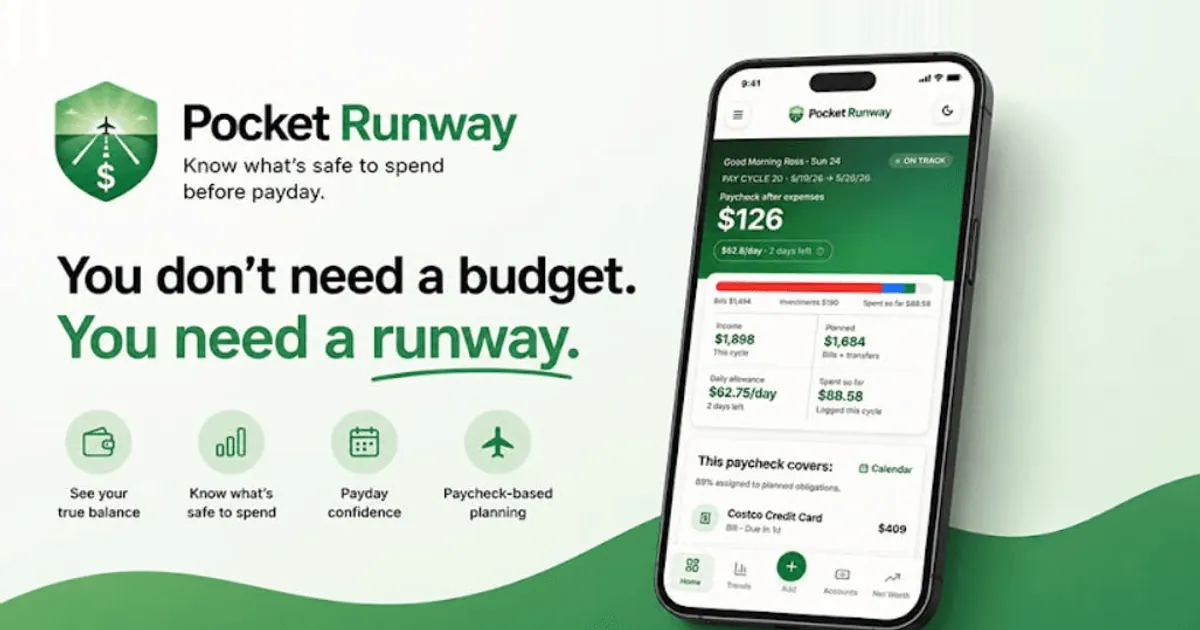
Shows what you can safely spend until payday from your Pocket Runway plan, read-only.
Images: pocketrunway.com
What Pocket Runway can do in ChatGPT
See what is safe to spend until payday.
Daily Allowance
Check how much you can spend today and stay on plan.
Upcoming Bills
See obligations due before your next payday.
Pay Period View
Understand how this period is funded and allocated.
Purchase Test
Try a purchase and see how it changes your runway.
Bill Matching
Check whether a bill is already in your recurring plan.
You stay in control
You approve access, and you can disconnect Pocket Runway at any time.
Apps 1
What Pocket Runway does in ChatGPT
The Pocket Runway plugin connects ChatGPT to your Pocket Runway account so you can see how much is safe to spend before your next payday. It shows your daily spending allowance and the bills and other payments coming up in the current period.
You can also see how the money in this pay period is funded and where it is set aside, and try out a purchase you are thinking about to see how it would change your runway. The numbers come from the pay-period plan and data already in your account, using fixed calculations rather than guesses.
The connection is read-only, so ChatGPT can look at your plan but cannot change anything in your Pocket Runway account. To use it you need a Pocket Runway account with a pay-period plan set up. Answers describe your own plan and numbers, and they are not financial advice.
Who it is for
- Pocket Runway users
- People budgeting paycheck to paycheck
- Anyone checking a purchase before buying
How to add Pocket Runway to ChatGPT
- Open the Pocket Runway listing in ChatGPT ↗.
- Click Install plugin.
- Sign in to your Pocket Runway account when asked and approve the access it requests.
- Start a chat and ask for what you need, mentioning Pocket Runway if ChatGPT does not pick it up.
- To stop, disconnect Pocket Runway under apps in your ChatGPT settings.
Questions about Pocket Runway
What is the Pocket Runway ChatGPT plugin?
The Pocket Runway plugin connects ChatGPT to your Pocket Runway account so you can see how much is safe to spend before your next payday. It shows your daily spending allowance and the bills and other payments coming up in the current period. It is listed in ChatGPT's plugin marketplace under Finance.
What can I ask Pocket Runway to do in ChatGPT?
For example: "How much can I safely spend today?", "What bills do I have coming up over the next 30 days?", "Is this bill already in my recurring plan?".
Who makes the Pocket Runway plugin for ChatGPT?
The ChatGPT listing names ROSS THOMAS EISENSCHENK as the developer. The version listed on 8 October 2026 was 1.1.1.
How do I add Pocket Runway to ChatGPT?
Open the Pocket Runway listing in ChatGPT, click Install plugin, sign in to your Pocket Runway account and approve the access it asks for. Then ask for what you need in a chat, mentioning Pocket Runway if ChatGPT does not pick it up.
Can Pocket Runway change things in my account, or only read?
It reads your pay-period plan, allowance and upcoming obligations from Pocket Runway. It is read-only and cannot modify your account.
Who is the Pocket Runway plugin for?
Pocket Runway users, people budgeting paycheck to paycheck and anyone checking a purchase before buying.
Can I test a purchase before making it?
Yes. You can describe a hypothetical purchase and see how it would affect your runway until payday.
Can ChatGPT edit my Pocket Runway plan?
No. The listing says the integration is read-only.
Does Pocket Runway see my ChatGPT chats?
When Pocket Runway is connected, ChatGPT may share the parts of your chats and memories that matter for a request with Pocket Runway. What Pocket Runway does with that data falls under its own terms and privacy policy. ChatGPT keeps your training-data settings, and you can disconnect at any time.
How do I disconnect Pocket Runway from ChatGPT?
Open your ChatGPT settings, go to apps, and disconnect Pocket Runway. You can reconnect later from the listing.
What are alternatives to Pocket Runway in ChatGPT?
Similar plugins in the ChatGPT marketplace include Simply Family Budget, re:cap and Allowance. Each has its own page in this directory.


Privacy and your data
When Pocket Runway is connected, ChatGPT may share the parts of your chats and memories that matter for a request with Pocket Runway. What Pocket Runway then does with that data falls under its own terms and privacy policy, not only OpenAI's. ChatGPT keeps your training-data settings for data that comes from connected apps, and you can disconnect at any time.
Pocket Runway privacy policy ↗Pocket Runway terms ↗OpenAI: apps in ChatGPT ↗