
SearchFit
Tracks how AI assistants mention your brand and helps write content, audits and search reports.
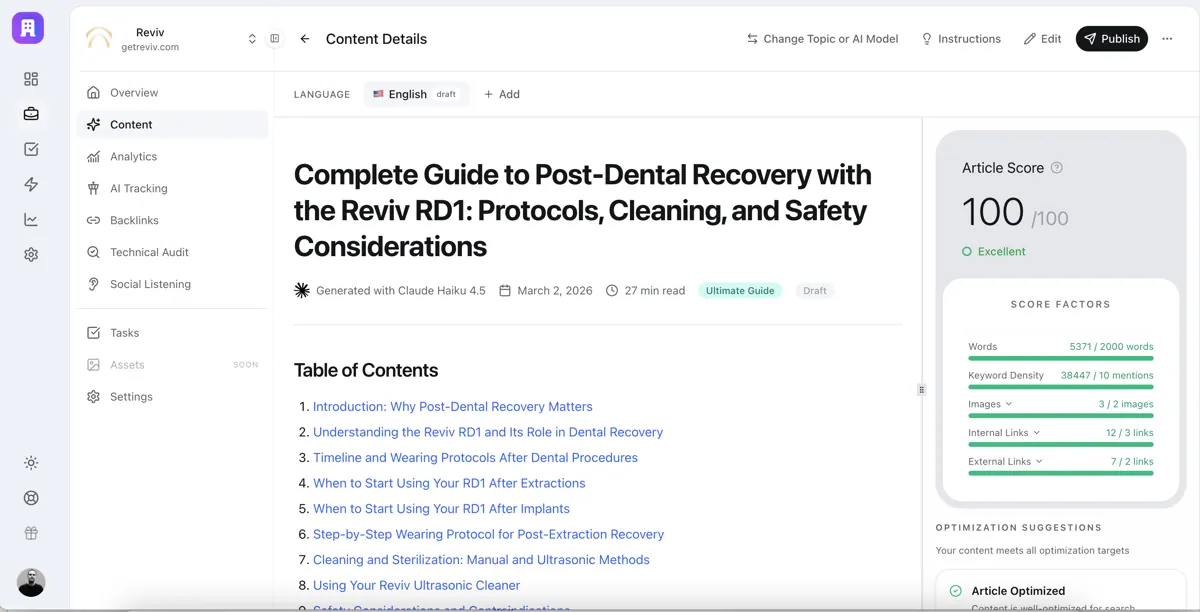

Images: searchfit.ai
What SearchFit can do in ChatGPT
See and improve how AI answers mention you.
AI Visibility
See if AI assistants mention your brand versus competitors.
Article Writing
Write and publish articles for questions you are losing.
Site Audits
Find technical problems on your website.
Search Reports
Combine Search Console, GA4 and AI visibility data.
Keyword Research
Research keywords and what competitors rank for.
You stay in control
You approve access, and you can disconnect SearchFit at any time.
Apps 1
What SearchFit does in ChatGPT
The SearchFit plugin shows how a brand appears in answers from AI assistants. It checks whether ChatGPT, Perplexity, Gemini, Claude and Google AI mention your brand for the questions buyers ask, and how you compare with competitors on those same questions.
Once you know where you are missing, it helps fill the gap. It can write articles aimed at the questions you are losing and publish them to a connected content system. It also researches keywords and competitors, audits a website for technical problems, and listens to Reddit conversations.
For reporting, it pulls Google Search Console and Google Analytics 4 data and combines it with AI visibility in one report. You need a SearchFit account with at least one brand set up. The listing names separate skills for each of these jobs, from content to performance reports.
Built-in skills
The listing says SearchFit comes with 8 skills. Skills are ready-made instructions ChatGPT can use for a specific job.
- Ai visibility report
- Content production
- Google analytics report
- Google search console report
- Keyword competitor research
- Performance report
- Technical site audit
- Reddit social listening
Who it is for
- Marketing teams tracking AI search
- SEO specialists and agencies
- Brands checking competitor visibility
How to add SearchFit to ChatGPT
- Open the SearchFit listing in ChatGPT ↗.
- Click Install plugin.
- Sign in to your SearchFit account when asked and approve the access it requests.
- Start a chat and ask for what you need, mentioning SearchFit if ChatGPT does not pick it up.
- To stop, disconnect SearchFit under apps in your ChatGPT settings.
Questions about SearchFit
What is the SearchFit ChatGPT plugin?
The SearchFit plugin shows how a brand appears in answers from AI assistants. It checks whether ChatGPT, Perplexity, Gemini, Claude and Google AI mention your brand for the questions buyers ask, and how you compare with competitors on those same questions. It is listed in ChatGPT's plugin marketplace under Business & Operations.
What can I ask SearchFit to do in ChatGPT?
For example: "How does my brand show up in ChatGPT answers compared to competitors?", "Write an article for the AI search question my brand is losing", "Create last month's report from Search Console and Google Analytics". It also comes with built-in skills such as Ai visibility report, Content production and Google analytics report.
Who makes the SearchFit plugin for ChatGPT?
The ChatGPT listing names SearchFIT as the developer. The version listed on 8 October 2026 was 1.0.0.
How do I add SearchFit to ChatGPT?
Open the SearchFit listing in ChatGPT, click Install plugin, sign in to your SearchFit account and approve the access it asks for. Then ask for what you need in a chat, mentioning SearchFit if ChatGPT does not pick it up.
Can SearchFit change things in my account, or only read?
It reads your SearchFit brands, AI visibility data, Search Console and Google Analytics 4, and can publish articles to a connected content system.
Who is the SearchFit plugin for?
Marketing teams tracking AI search, sEO specialists and agencies and brands checking competitor visibility.
Which AI assistants does SearchFit check?
ChatGPT, Perplexity, Gemini, Claude and Google AI.
Do I need a SearchFit account?
Yes. The listing says you need an account with at least one brand.
Can it publish the articles it writes?
Yes, to a content management system you have connected to SearchFit.
Does SearchFit see my ChatGPT chats?
When SearchFit is connected, ChatGPT may share the parts of your chats and memories that matter for a request with SearchFit. What SearchFit does with that data falls under its own terms and privacy policy. ChatGPT keeps your training-data settings, and you can disconnect at any time.
How do I disconnect SearchFit from ChatGPT?
Open your ChatGPT settings, go to apps, and disconnect SearchFit. You can reconnect later from the listing.
What are alternatives to SearchFit in ChatGPT?
Similar plugins in the ChatGPT marketplace include Asva AI, IQRush and Able SEO by VibeSEO. Each has its own page in this directory.


Privacy and your data
When SearchFit is connected, ChatGPT may share the parts of your chats and memories that matter for a request with SearchFit. What SearchFit then does with that data falls under its own terms and privacy policy, not only OpenAI's. ChatGPT keeps your training-data settings for data that comes from connected apps, and you can disconnect at any time.
SearchFit privacy policy ↗SearchFit terms ↗OpenAI: apps in ChatGPT ↗