
Tailwind
Drafts, schedules and manages Pinterest Pins and boards through your Tailwind account.

Images: tailwindapp.com
What Tailwind can do in ChatGPT
Plan and schedule Pinterest Pins from chat.
Pin Drafts
Create Pin drafts from a web page or blog post.
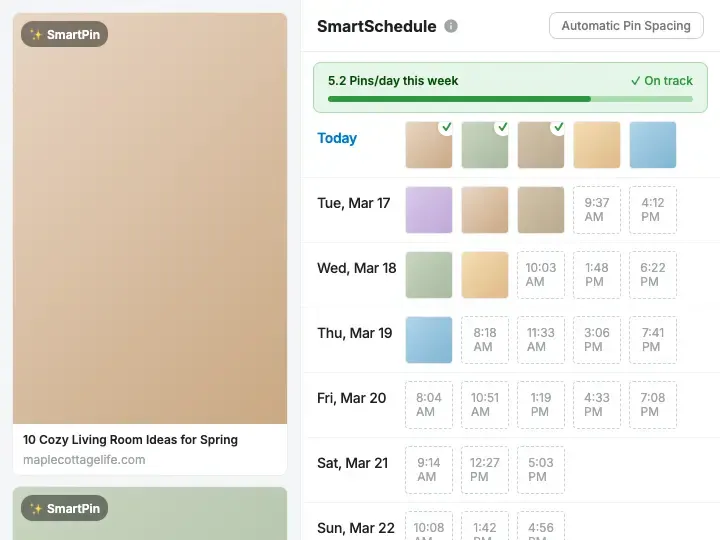
Pin Scheduling
Schedule Pins to boards using suggested posting times.
Board Management
Create boards and browse boards and sections.
Group Board Research
Find public group boards on a topic.
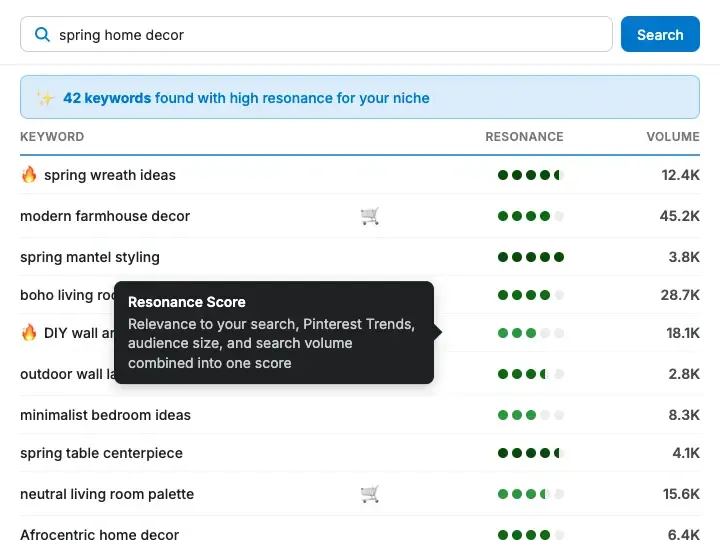
Keyword List
Keep a saved list of keywords to target.
You stay in control
You approve access, and you can disconnect Tailwind at any time.
Apps 1
What Tailwind does in ChatGPT
The Tailwind plugin connects ChatGPT to a Tailwind account for Pinterest marketing. It can turn a web page, such as a new blog post, into Pin drafts, then schedule those Pins to the boards you choose. You can review and edit the text before anything goes out.
It also helps with boards. You can browse your connected accounts, boards and board sections, create and manage boards, and look up public Pinterest group boards on a topic. The listing mentions skills for auditing a Pinterest board or profile and for planning a posting schedule.
For planning, it shows suggested posting times, lists what is queued, and lets you change the text of drafts and scheduled Pins or delete Pins that have not been published. It can also check an account's subscription status and keep a saved list of keywords you want to target.
Built-in skills
The listing says Tailwind comes with 3 skills. Skills are ready-made instructions ChatGPT can use for a specific job.
- Tailwind pinterest board audit
- Tailwind pinterest profile audit
- Tailwind pinterest scheduling
Who it is for
- Bloggers driving traffic from Pinterest
- Online shops promoting products on Pinterest
- Social media managers
How to add Tailwind to ChatGPT
- Open the Tailwind listing in ChatGPT ↗.
- Click Install plugin.
- Sign in to your Tailwind account when asked and approve the access it requests.
- Start a chat and ask for what you need, mentioning Tailwind if ChatGPT does not pick it up.
- To stop, disconnect Tailwind under apps in your ChatGPT settings.
Questions about Tailwind
What is the Tailwind ChatGPT plugin?
The Tailwind plugin connects ChatGPT to a Tailwind account for Pinterest marketing. It can turn a web page, such as a new blog post, into Pin drafts, then schedule those Pins to the boards you choose. You can review and edit the text before anything goes out. It is listed in ChatGPT's plugin marketplace under Business & Operations.
What can I ask Tailwind to do in ChatGPT?
For example: "Draft a Pin for my new blog post and save it for review", "Schedule this Pin to my Recipes board for Thursday at 9am", "What Pins are queued to publish this week?". It also comes with built-in skills such as Tailwind pinterest board audit, Tailwind pinterest profile audit and Tailwind pinterest scheduling.
Who makes the Tailwind plugin for ChatGPT?
The ChatGPT listing names Tailwind App as the developer. The version listed on 8 October 2026 was 0.2.0.
How do I add Tailwind to ChatGPT?
Open the Tailwind listing in ChatGPT, click Install plugin, sign in to your Tailwind account and approve the access it asks for. Then ask for what you need in a chat, mentioning Tailwind if ChatGPT does not pick it up.
Can Tailwind change things in my account, or only read?
It reads your Tailwind accounts, boards, drafts, schedule, keywords and subscription status, and can create boards, schedule Pins, edit copy and delete unpublished Pins.
Who is the Tailwind plugin for?
Bloggers driving traffic from Pinterest, online shops promoting products on Pinterest and social media managers.
Can I check a Pin before Tailwind schedules it?
Yes. Drafts can be saved for review, and you can edit the copy on drafts and scheduled Pins.
Can it delete Pins that are already live?
The listing only mentions deleting unpublished Pins.
Does Tailwind see my ChatGPT chats?
When Tailwind is connected, ChatGPT may share the parts of your chats and memories that matter for a request with Tailwind. What Tailwind does with that data falls under its own terms and privacy policy. ChatGPT keeps your training-data settings, and you can disconnect at any time.
How do I disconnect Tailwind from ChatGPT?
Open your ChatGPT settings, go to apps, and disconnect Tailwind. You can reconnect later from the listing.
What are alternatives to Tailwind in ChatGPT?
Similar plugins in the ChatGPT marketplace include AdKit - Ads Manager, Adspirer and Close. Each has its own page in this directory.



Privacy and your data
When Tailwind is connected, ChatGPT may share the parts of your chats and memories that matter for a request with Tailwind. What Tailwind then does with that data falls under its own terms and privacy policy, not only OpenAI's. ChatGPT keeps your training-data settings for data that comes from connected apps, and you can disconnect at any time.
Tailwind privacy policy ↗Tailwind terms ↗OpenAI: apps in ChatGPT ↗