
Energy Aspects
Gives access to Energy Aspects research, analyst commentary and market data on oil, gas and power.

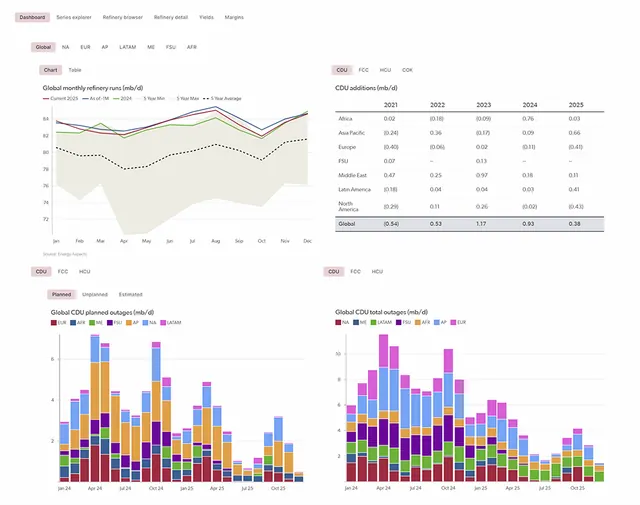


Images: energyaspects.com
What Energy Aspects can do in ChatGPT
Energy market research and data in your chat.
Research Reports
Read in-depth analysis and forecasts on energy markets.
EA Live Commentary
See short analyst notes on what moves markets during the day.
Timeseries Data
Query supply, demand, inventories, flows and prices over time.
Point-In-Time Data
Check how a data series looked at an earlier release.
Market Coverage
Covers oil, gas, power and related energy markets.
You stay in control
You approve access, and you can disconnect Energy Aspects at any time.
Apps 1
What Energy Aspects does in ChatGPT
The Energy Aspects plugin connects ChatGPT to research from Energy Aspects, an independent firm that studies energy markets. It covers oil, gas, power and related markets, and draws on three kinds of content: research reports, short analyst posts during the day, and a library of data series.
The research reports hold longer analysis and forecasts. EA Live posts are quick notes from analysts on what is moving in the market that day. The data library tracks numbers such as supply, demand, inventories, flows and prices over time.
You can also query the data as it looked at an earlier release, not only the latest numbers. That helps when you want to see what was known at a given date. The plugin presents the firm's research and data; it does not give personal investment advice.
Who it is for
- Energy traders following markets
- Analysts who need energy data series
- Energy professionals reading research
How to add Energy Aspects to ChatGPT
- Open the Energy Aspects listing in ChatGPT ↗.
- Click Install plugin.
- Sign in to your Energy Aspects account when asked and approve the access it requests.
- Start a chat and ask for what you need, mentioning Energy Aspects if ChatGPT does not pick it up.
- To stop, disconnect Energy Aspects under apps in your ChatGPT settings.
Questions about Energy Aspects
What is the Energy Aspects ChatGPT plugin?
The Energy Aspects plugin connects ChatGPT to research from Energy Aspects, an independent firm that studies energy markets. It covers oil, gas, power and related markets, and draws on three kinds of content: research reports, short analyst posts during the day, and a library of data series. It is listed in ChatGPT's plugin marketplace under Business & Operations.
What can I ask Energy Aspects to do in ChatGPT?
For example: "Summarize the latest Energy Aspects research on crude oil", "What are analysts saying on EA Live about European gas today?", "Show US crude inventory data for the last year".
Who makes the Energy Aspects plugin for ChatGPT?
The ChatGPT listing names Energy Aspects as the developer. The version listed on 8 October 2026 was 1.0.0.
How do I add Energy Aspects to ChatGPT?
Open the Energy Aspects listing in ChatGPT, click Install plugin, sign in to your Energy Aspects account and approve the access it asks for. Then ask for what you need in a chat, mentioning Energy Aspects if ChatGPT does not pick it up.
Can Energy Aspects change things in my account, or only read?
It reads Energy Aspects research publications, EA Live posts and timeseries data. The listing does not mention changing anything.
Who is the Energy Aspects plugin for?
Energy traders following markets, analysts who need energy data series and energy professionals reading research.
Which markets does Energy Aspects cover?
Oil, gas, power and related markets, according to the listing.
Can I see older versions of a data series?
Yes. The listing mentions point-in-time queries against historical releases.
Does Energy Aspects see my ChatGPT chats?
When Energy Aspects is connected, ChatGPT may share the parts of your chats and memories that matter for a request with Energy Aspects. What Energy Aspects does with that data falls under its own terms and privacy policy. ChatGPT keeps your training-data settings, and you can disconnect at any time.
How do I disconnect Energy Aspects from ChatGPT?
Open your ChatGPT settings, go to apps, and disconnect Energy Aspects. You can reconnect later from the listing.
What are alternatives to Energy Aspects in ChatGPT?
Similar plugins in the ChatGPT marketplace include Skills, Able SEO by VibeSEO and Ahrefs. Each has its own page in this directory.



Privacy and your data
When Energy Aspects is connected, ChatGPT may share the parts of your chats and memories that matter for a request with Energy Aspects. What Energy Aspects then does with that data falls under its own terms and privacy policy, not only OpenAI's. ChatGPT keeps your training-data settings for data that comes from connected apps, and you can disconnect at any time.
Energy Aspects privacy policy ↗Energy Aspects terms ↗OpenAI: apps in ChatGPT ↗