
Sleekplan
Manages your Sleekplan feedback board, roadmap, changelog and surveys from ChatGPT.
Images: sleekplan.com
What Sleekplan can do in ChatGPT
Run your feedback board and changelog by asking.
Top Requests
Summarize feature requests ranked by votes and activity.
Merge Duplicates
Combine duplicate posts so votes land on one request.
Changelog Entries
Draft and publish an update when something ships.
Survey Results
Review NPS, CSAT and other survey responses.
Customer Replies
Update statuses, add tags and comment on posts.
You stay in control
You approve access, and you can disconnect Sleekplan at any time.
Apps 1
What Sleekplan does in ChatGPT
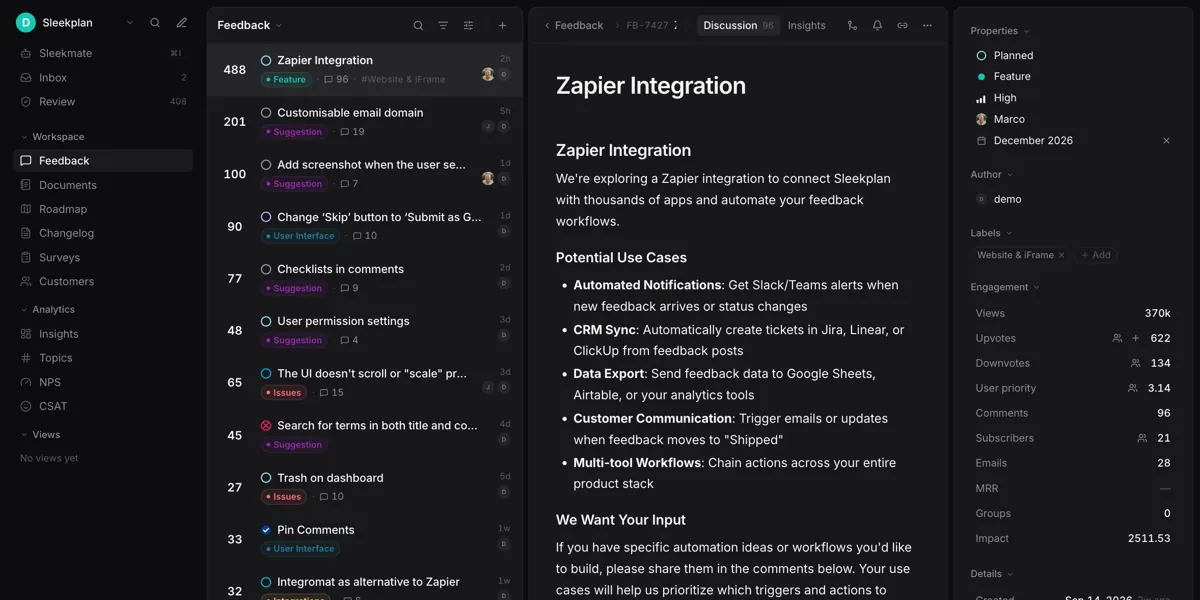
The Sleekplan plugin connects ChatGPT to your Sleekplan workspace, which holds your feedback board, roadmap, changelog and surveys. You can ask for a summary of the most requested features, ranked by votes and recent activity, to see what customers want most.
It helps keep the board tidy. You can find duplicate posts and merge them so votes add up on one request, change statuses, add tags and reply to customers in comments. When something ships, you can write and publish a changelog entry from the chat.
You can also review NPS, CSAT and other survey answers. The listing counts more than 40 actions. Reading data runs right away, while creating, editing, merging or deleting is shown to you first and needs your confirmation. You need admin or contributor access.
Who it is for
- Product managers running a feedback board
- Founders shipping product updates
- Support teams replying to feature requests
How to add Sleekplan to ChatGPT
- Open the Sleekplan listing in ChatGPT ↗.
- Click Install plugin.
- Sign in to your Sleekplan account when asked and approve the access it requests.
- Start a chat and ask for what you need, mentioning Sleekplan if ChatGPT does not pick it up.
- To stop, disconnect Sleekplan under apps in your ChatGPT settings.
Questions about Sleekplan
What is the Sleekplan ChatGPT plugin?
The Sleekplan plugin connects ChatGPT to your Sleekplan workspace, which holds your feedback board, roadmap, changelog and surveys. You can ask for a summary of the most requested features, ranked by votes and recent activity, to see what customers want most. It is listed in ChatGPT's plugin marketplace under Data & Analytics.
What can I ask Sleekplan to do in ChatGPT?
For example: "Summarize our most-requested features", "Create an NPS survey for our customers", "Turn my commit notes into a changelog draft".
Who makes the Sleekplan plugin for ChatGPT?
The ChatGPT listing names Sleekplan GmbH as the developer. The version listed on 8 October 2026 was 1.0.0.
How do I add Sleekplan to ChatGPT?
Open the Sleekplan listing in ChatGPT, click Install plugin, sign in to your Sleekplan account and approve the access it asks for. Then ask for what you need in a chat, mentioning Sleekplan if ChatGPT does not pick it up.
Can Sleekplan change things in my account, or only read?
It reads and changes posts, votes, comments, tags, statuses, users, segments, surveys and changelog entries in your Sleekplan workspace. Any change is shown to you and confirmed before it runs.
Who is the Sleekplan plugin for?
Product managers running a feedback board, founders shipping product updates and support teams replying to feature requests.
What access do I need for Sleekplan?
A Sleekplan workspace with admin or contributor access, signed in with your Sleekplan account.
Can it merge duplicate requests?
Yes. It can find duplicate posts and merge them so votes count toward one request.
Does Sleekplan see my ChatGPT chats?
When Sleekplan is connected, ChatGPT may share the parts of your chats and memories that matter for a request with Sleekplan. What Sleekplan does with that data falls under its own terms and privacy policy. ChatGPT keeps your training-data settings, and you can disconnect at any time.
How do I disconnect Sleekplan from ChatGPT?
Open your ChatGPT settings, go to apps, and disconnect Sleekplan. You can reconnect later from the listing.
What are alternatives to Sleekplan in ChatGPT?
Similar plugins in the ChatGPT marketplace include Enterpret, BigQuery and PostHog. Each has its own page in this directory.



Privacy and your data
When Sleekplan is connected, ChatGPT may share the parts of your chats and memories that matter for a request with Sleekplan. What Sleekplan then does with that data falls under its own terms and privacy policy, not only OpenAI's. ChatGPT keeps your training-data settings for data that comes from connected apps, and you can disconnect at any time.
Sleekplan privacy policy ↗Sleekplan terms ↗OpenAI: apps in ChatGPT ↗